AI+UX Research | B2B FINTECH | 2023
Designing AI That Fits the Way Sales Teams Work
Research to identify where AI could create value, define the right level of automation, and shape the MVP.
ROLE
UX Research
TIMELINE
2022-2023
SCOPE
Mixed-method
& design sprint

DEFINING THE VISION
At MightyBot, the team set out to solve a growing problem: Revenue teams are overwhelmed by administrative tasks,
and spending more time updating CRMs than closing deals. Our mission was to build an AI copilot that automates the busywork, empower smarter decisions, and help sales teams focus on what truly matters: building client relationships and boosting revenue.
MY ROLE
From day one, our team wasn’t just designing an AI copilot, we were building a vision from the ground up.
As Director of Product Design and Research and a founding team member, I led the user research and UX strategy that took Mightybot from an early concept to MVP.
Three key focus areas:
Product strategy: definined where AI could meaningfully support salespeople and which problems were worth solving.
Human-AI experience: understanding how people wanted to work with an AI copilot, including where automation was useful and where users needed visibility and control.
From concept to MVP: turning early research and product hypotheses into a focused experience that could be built, tested, and refined.
IDEA TO MVP
In a fast-paced startup environment, we moved quickly from an early idea to a working AI copilot.
Through research, design, and close collaboration across product and engineering, we defined the core experience, built the MVP, and created an investor-facing demo that clearly communicated the product’s value.
Prototype of MightyBot's copilot experience

Research process
WORKFLOW MAPPING

Before defining the product, we studied how sales teams actually worked, where existing tools created friction, and which parts of the workflow were best suited for AI support.
Mapped end-to-end sales workflows: identified recurring friction across CRM, follow-up, and administrative tasks.
Turned findings into product priorities: helped the team focus on the problems where AI could provide the most meaningful value.
Defined the copilot’s role: clarified where the system should assist, automate, or stay out of the way based on how users wanted to work.
The research gave the team a clearer basis for deciding what to build first and helped shape the product roadmap around real workflow needs.
Administrative work was a major opportunity for automation.
Up to 80% of recurring tasks such as CRM updates, note-taking, and follow-ups could be automated or streamlined, freeing sales teams to spend more time on customer relationships and selling.
Fragmented tools were also creating friction. Salespeople were moving between multiple systems to manage their work, adding overhead and making existing tools harder to adopt consistently.


Once we understood where AI could reduce friction, the next question was how it should be adopted in the workflow.
We explored how salespeople responded to different levels of automation, what made AI feel helpful versus intrusive, and where they wanted visibility or control over the system’s actions.
This helped us move beyond identifying tasks to automate and start defining the role the copilot should play in the broader sales experience.
The research surfaced a consistent pattern: users were open to AI support when it reduced repetitive work without taking over the parts of the job they considered high-value or relationship-driven.
These findings became design principles for the copilot and helped define where the system should assist, automate, or defer to the user.

Product prioritization
FROM RESEARCH TO PRODUCT PRIORITIES
We translated the research into a prioritization framework that balanced user value, implementation effort, and fit with the product strategy.
High-frequency tasks such as CRM updates and follow-up scheduling rose to the top because they created recurring friction and were well suited for AI assistance.
This gave the team a clearer basis for focusing design effort on the parts of the workflow where automation could create the most immediate value.
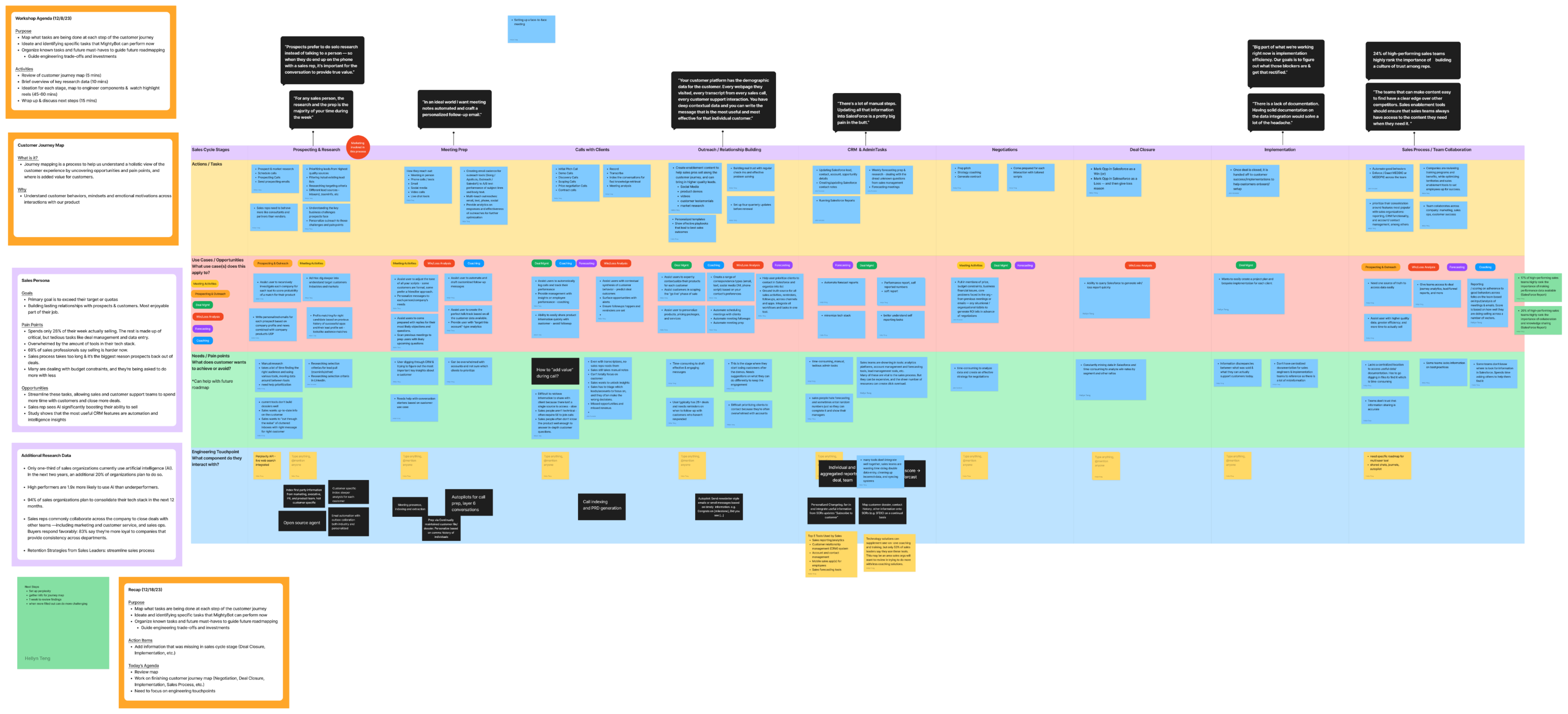
PRIORITIZATION WORKSHOP
I led the team through a product strategy mapping workshop that connected research findings to product priorities.
It helped us align on the highest-value use cases, define the MVP, and make clearer decisions about what to build first.
ARTEFACT FROM WORKSHOP
Design Process
TRANSLATING RESEARCH INTO DESIGN
With the core use cases prioritized, we translated the research into 3 principles for the experience: reduce repetitive work, fit naturally into existing workflows, and give users enough visibility and control to trust the system.
These principles shaped both the interaction model and the level of autonomy we designed into the copilot. Rather than automate everything possible, we focused on where AI could reduce effort while keeping users informed and able to intervene.
DESIGNING THE HUMAN-AI INTERACTION
I led the design of the core copilot experience, combining conversational interaction with proactive assistance for recurring sales tasks.
The research shaped several key decisions:
Structured Responses
AI-generated information was organized for quick scanning rather than presented as long conversational output.
Visible Feedback And Correction
Users could refine suggestions and provide feedback when the system got something wrong.
Clear System Behavior
We designed interactions so users could understand what the copilot was doing and what would happen next.
Focused Automation
The system prioritized repetitive, lower-risk tasks while keeping users involved in decisions that required judgment.
VISUAL EXPLORATION / IDEATION
We reviewed emerging AI interfaces and explored different ways of presenting prompts, responses, actions, and system status.
The goal was not to imitate existing chat interfaces, but to understand which patterns could make a work-focused copilot easier to scan, act on, and trust.

Refining Readability
We also explored typography and information hierarchy to make dense AI-generated content easier to scan and act on.

DESIGNING AUTOPILOT: AUTOMATION WITH OVERSIGHT
Autopilot was designed to move MightyBot beyond responding to requests and into proactively supporting recurring sales work. It could automate administrative tasks, surface relevant information, and help users stay on top of deals across tools such as Salesforce, Google, and LinkedIn.
As Autopilot became more proactive, the design challenge shifted from interaction to delegation. The question was no longer just what the AI should suggest, but what it should be allowed to do on the user’s behalf.
We designed the experience around selective delegation. Users could choose what to automate, review or adjust system behavior, and intervene when needed.
That gave us a clear principle for the feature: automate repetitive work, but keep higher-stakes actions visible and reviewable.

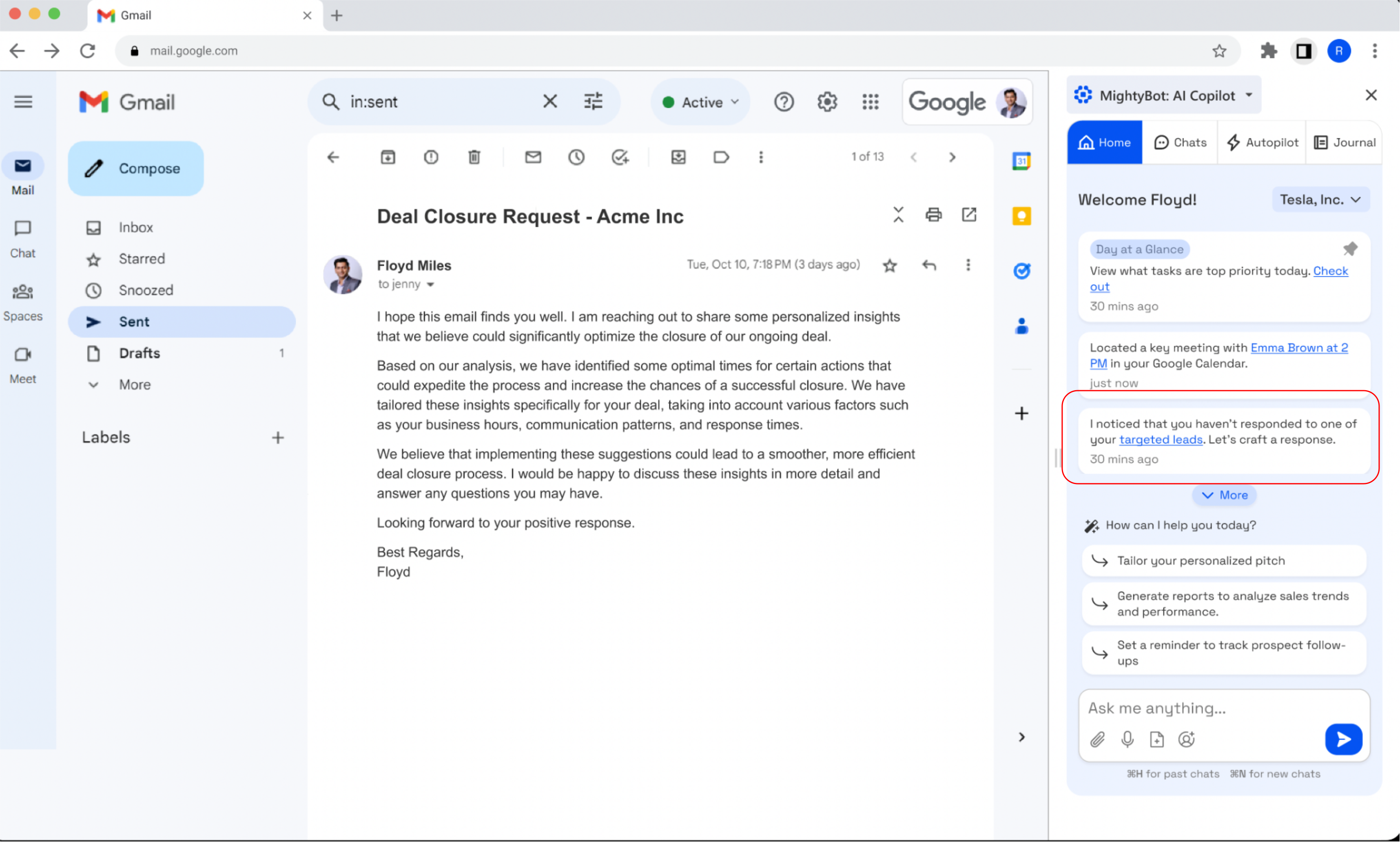
AUTOPILOT USE CASE: DRAFTING A SALES RESPONSE
One Autopilot use case was email follow-up.
MightyBot could use context from previous conversations to draft a response to a sales lead, surface it as a task on the Home tab, and open the draft in Gmail for review.
This showed how Autopilot could move from simply surfacing information to taking on part of the work while still keeping the user involved before anything was sent.
TESTING THE CORE & AUTOPILOT EXPERIENCE
We tested the core copilot and Autopilot experiences to understand what made proactive AI feel useful, trustworthy, and easy to integrate into existing workflows.
The overall experience received an average rating of 8/10, while the qualitative feedback surfaced several important conditions for continued adoption:
The testing reinforced an important finding from the earlier research: adoption depended not simply on what the AI could do, but on whether its actions were relevant, reliable, and easy for users to oversee.
“This is very cool. This solves a lot of problem of existing AI tools. Imagining how I use ChatGPT and our proprietary AI systems, there's still so much manual work that needs to happen. This just kills all the extra, unnecessary work which is awesome.”

DESIGNING FOR FIRST-TIME ADOPTION
Once the core copilot experience was defined, we turned to another adoption challenge: helping users understand what MightyBot could do, connect it to their existing tools, and feel comfortable giving it access to their workflow.
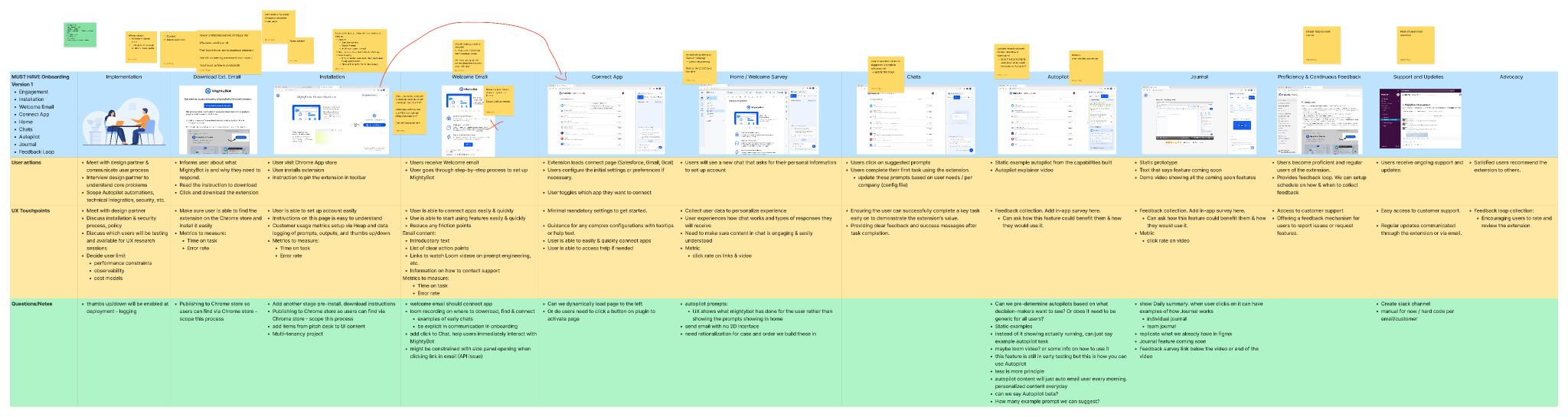
I led a cross-functional workshop to map the onboarding journey, identify likely points of friction, and define what users needed to understand before they could experience value from the product. The work focused on three questions:
What does the user need to understand immediately?
Make the product’s role and value clear without overwhelming them with instructions.
What does the user need to trust before connecting their tools?
Explain data access, AI behavior, and user control at the moments where those concerns become relevant.
How quickly can we get them to meaningful use?
Reduce setup requirements and move users into the product as soon as they are ready.
Workshop artefact of user onboarding mapping
TESTING THE PATH TO ACTIVATION
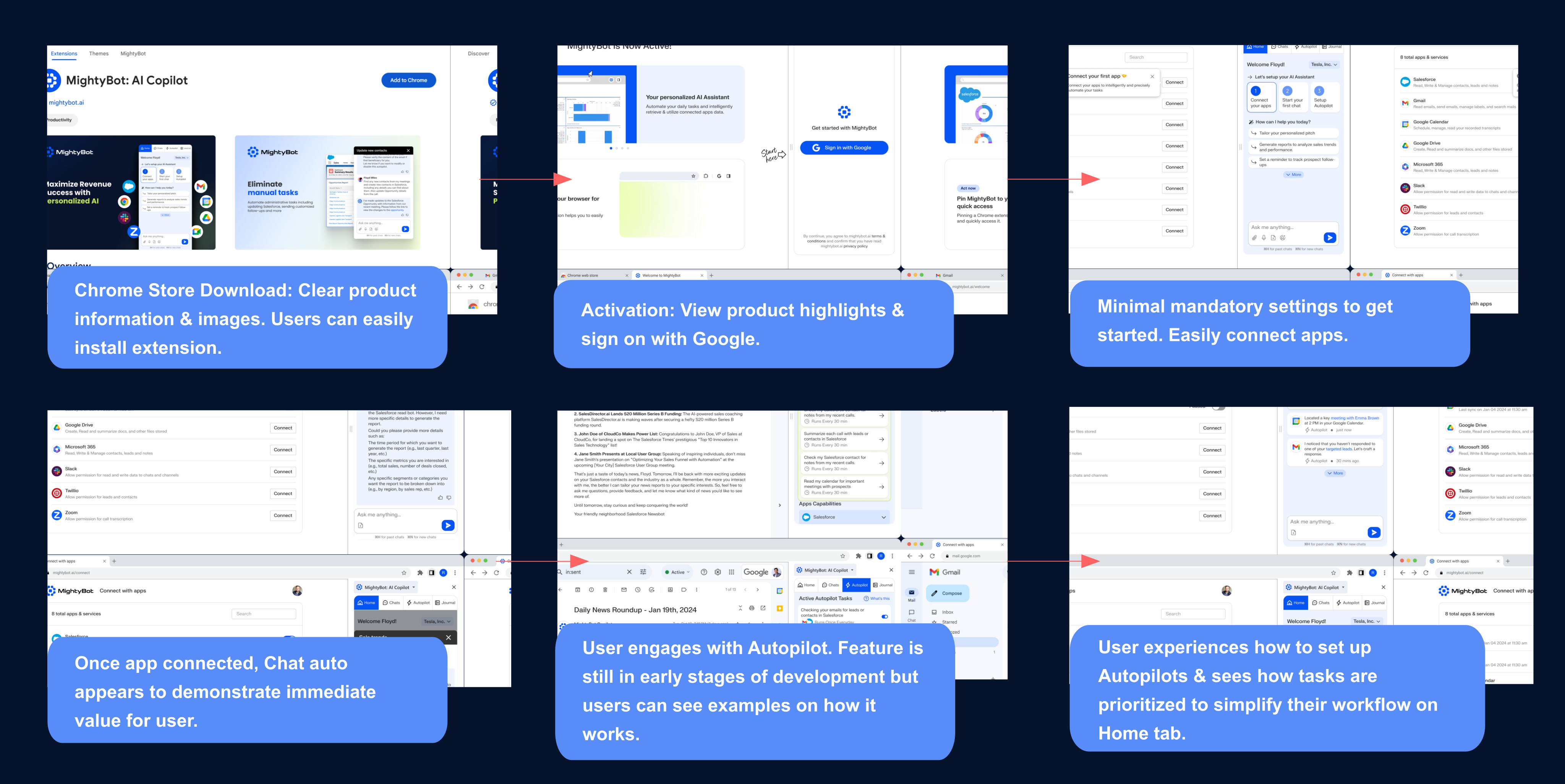
We tested the onboarding journey across the welcome email, extension setup, and app connection flow. A consistent pattern emerged: users wanted less explanation and a faster path into the product. Testing led us to simplify the journey:
Reduce upfront content
Users preferred concise guidance and visual examples over detailed instructions.
Make setup progress explicit
Clearly labeling the setup sequence helped users understand what remained before they could begin.
Let users start sooner
Once apps were connected, many users wanted to begin using the copilot rather than complete every Autopilot configuration step.
Provide help without blocking progress
Guidance and help-center content remained available for users who needed it without forcing everyone through it.
WHAT WE LEARNED ABOUT AI ADOPTION
MightyBot started with a broad question about where AI could improve sales work. Research helped us narrow that into a much more specific product direction: automate repetitive work, surface useful recommendations, and keep users involved when actions required judgment or carried greater consequences.
Across discovery, prototyping, and usability testing, the same pattern continued to surface. Users were most receptive to AI when it was relevant to their workflow, transparent about what it was doing, and easy to correct or override.
Those findings shaped the product beyond individual interface decisions. They influenced which capabilities we prioritized, how much autonomy we gave the system, how we introduced the product to new users, and how the copilot communicated recommendations and actions.
The project strengthened my approach to human-AI research: capability alone does not determine whether people will use an AI product. Adoption depends on understanding where automation creates meaningful value, where people still need judgment and control, and how the system earns enough trust to become part of everyday work.
BEYOND THE BUILD: DESIGNING AI FOR ENTERPRISE TEAMS
I co-authored an article with Douglas Melchoir, former VP of Product at Ocrolus, reflecting on what we learned from designing and scaling AI/ML products for enterprise teams. Read Medium Article
The article looks at recurring challenges in AI adoption, including trust, workflow fit, transparency, and deciding where automation should support rather than replace human judgment.
A key takeaway is that strong AI experiences depend on designing around the complementary strengths of people and systems. AI can provide speed, scale, and pattern recognition, while people bring judgment, context, creativity, and adaptability. The product challenge is deciding where each adds the most value.